

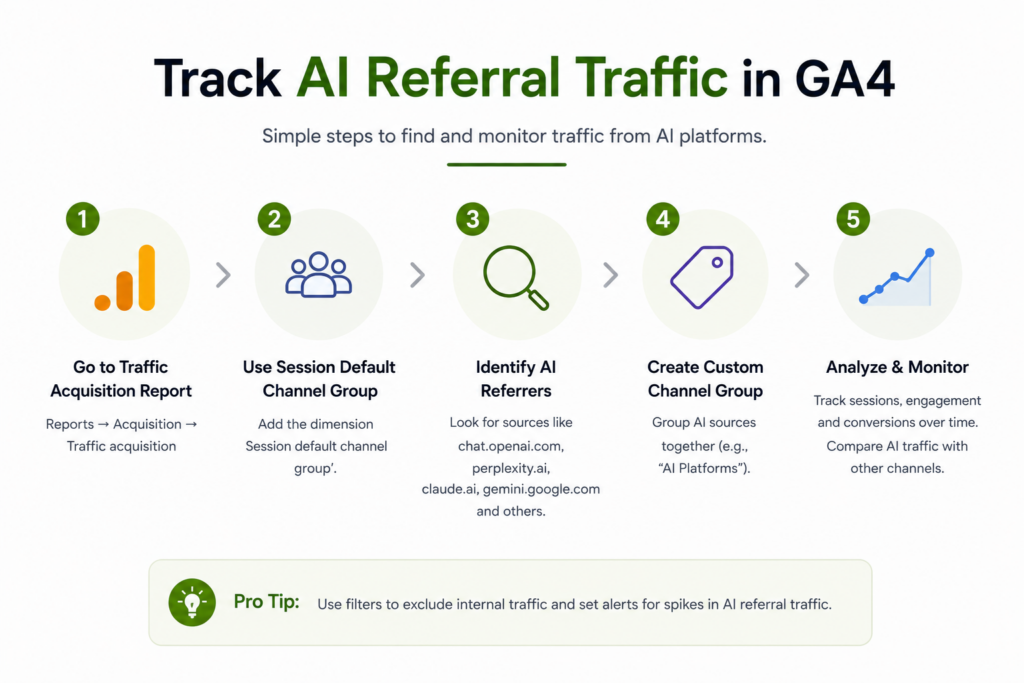
ChatGPT, Perplexity, and Claude are sending you visitors right now — and GA4 is hiding most of them in Referral and Direct. Here’s the 2026 setup that surfaces them as their own channel, the regex that does it, and the dark-traffic gap nobody warns you about.
GA4 · 2026 Measurement Guide
Your AI traffic is already here. GA4 just files it under the wrong name.
Google shipped a native AI Assistant channel in May 2026 — but it misses Perplexity, counts AI Overviews as organic, and ignores ~70% of AI visits that arrive with no referrer. This guide closes the gap.
TL;DR
- GA4 added a native “AI Assistant” channel on May 13, 2026 — zero setup, but it only recognizes about five sources (ChatGPT, Gemini, Deepseek, Copilot, Grok), excludes Perplexity, counts Google’s AI Overviews as Organic Search, and is not retroactive.
- The reliable fix is a custom channel group with a regex on Source, placed above Referral. Takes ~15 minutes and becomes a permanent line in every acquisition report.
- What you can see is an undercount. Roughly 70% of AI visits arrive with no referrer and fall into Direct, so treat GA4 as the floor, not the ceiling.
- It’s worth the effort: AI referral traffic converts at multiples of organic — run native + custom in parallel and report it as its own channel.
Open your GA4 Traffic Acquisition report right now and look for “AI,” “ChatGPT,” or “Perplexity.” Unless you’ve configured something, you won’t find a clean number. The traffic exists — it’s just scattered across Referral, Direct, and (for Google’s own AI) Organic Search.
That’s a reporting problem with real consequences. AI assistants have become a genuine discovery channel — a shift we unpack in Is SEO Dead in 2026? — and if you can’t measure the channel, you can’t argue for investing in it. This guide fixes that, step by step, with the current 2026 setup.
Why GA4 Hides Your AI Traffic by Default
Quick answer
By default, GA4 has no complete AI category. When someone clicks a link inside ChatGPT, Perplexity, or Claude, GA4 reads the referring domain (e.g. chatgpt.com) and files the session under generic Referral. When no referrer is passed — common on mobile apps and pasted links — it lands in Direct. Google’s own AI Overviews count as Organic Search. To see AI traffic as one clean number, you have to configure it.
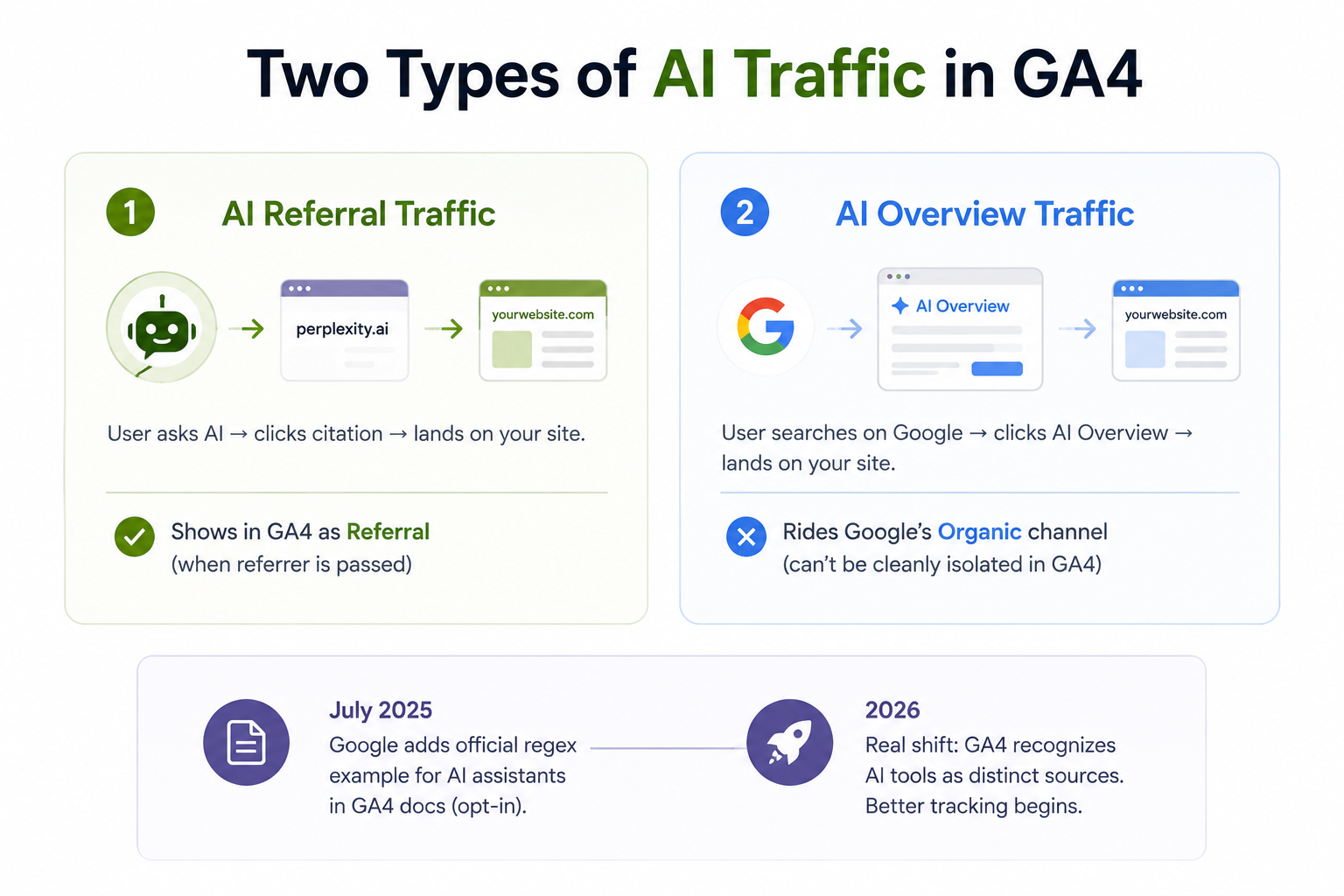
There are two distinct things people mean by “AI traffic,” and GA4 treats them completely differently:
- AI referral traffic — a real person uses an AI assistant, the answer cites your page, they click through. This passes through a domain like
perplexity.aiand (when a referrer survives) shows up as Referral. - AI Overview traffic — clicks from Google’s AI-generated summaries at the top of the SERP. This rides Google’s standard organic channel and currently can’t be cleanly isolated in GA4. (Optimizing for those is a separate discipline — see our guide to ranking in Google AI Overviews.)
This guide is about the first type — the trackable, high-intent clicks from standalone AI platforms. Google did add an official regex example for AI assistants to its GA4 docs in July 2025, the first time it recognized AI tools as distinct sources, but that was an opt-in suggestion, not a default. The real shift came in 2026.
GA4's Native AI Assistant Channel (The May 2026 Update)
On May 13, 2026, Google added a native AI Assistant channel to GA4. Qualifying visits are recognized automatically — no UTMs, no regex, no developer work — and slotted into a dedicated channel in your Default Channel Group reports, with the source dimensions standardized to Medium = ai-assistant. Wider availability rolled out through early June 2026.
It’s genuinely useful. It’s also quietly incomplete in four ways that matter the moment you put a number in front of a stakeholder:
| What it does | What it misses |
|---|---|
| Auto-recognizes major sources — by June 2026 the live docs name ChatGPT, Gemini, Deepseek, Copilot, and Grok | Perplexity is excluded — one of the highest-intent sources still lands in Referral |
| Appears in Traffic Acquisition & Session Default Channel Group reports with no config | Not retroactive — traffic before May 13, 2026 stays in its old channel; year-over-year AI comparisons are impossible from the native data alone |
| Assigns standard Medium/Campaign dimensions so you can build explorations on it | AI Overviews & AI Mode are explicitly excluded — counted as Organic Search, not AI |
| Currently session-scoped | The User Acquisition report doesn't yet show it as a dedicated entry; most no-referrer AI traffic still leaks into Direct |
Key insight
Don’t delete your custom rules now that a native channel exists. Because the AI Assistant channel isn’t retroactive, your custom channel group is the only bridge to historical data — and it’s the only thing currently catching Perplexity. The 2026 best practice is to run both in parallel.
Three Ways to Track AI Traffic in GA4
There are three approaches, in increasing order of permanence. Most teams want the third — but the first two are useful for a fast look or trend analysis.
| Method | Best for | Permanence |
|---|---|---|
| Quick filter in Traffic Acquisition | A one-off "how much AI traffic do we have?" check | Resets when you leave the report |
| Explore report with a regex filter | Trends over time + page-level and source-level detail | Saved exploration; reusable |
| Custom channel group | Permanent reporting — AI as its own row everywhere | Permanent (from creation date forward) |
Method 1 — The 2-Minute Quick Filter
For a fast gut-check without changing any settings:
Open Traffic Acquisition
Go to Reports → Acquisition → Traffic acquisition.Set the table dimension
Change the primary dimension to Session source / medium.Add a regex filter on Session source
Click Add filter, choose Session source, condition matches regex, and paste the short pattern below. Note GA4’s in-report filter has a ~250-character limit, so use the compact version.
Compact regex — top AI sources (in-report filter)
chatgpt\.com|chat\.openai\.com|perplexity\.ai|claude\.ai|gemini\.google\.com|copilot\.microsoft\.com|deepseek\.com|grok\.com|meta\.ai|you\.com
The catch: this filter evaporates as soon as you refresh or leave the report. For anything you’ll look at twice, use Method 2 or 3.
Method 2 — The Custom Channel Group (The Permanent Fix)
This is the one to actually implement. A custom channel group makes AI traffic appear as its own channel in every standard acquisition report — alongside Organic Search, Direct, and Referral — and it keeps working in the background.
Open Channel groups
Go to Admin → Data display → Channel groups. You’ll see Google’s default group — don’t edit it. Click Create new channel group (or Copy the default to keep all existing channels intact).Name the group
Something explicit like “Default + AI Traffic (2026)” — you’ll be updating it as new platforms appear, so date it.Add a new channel
Click Add new channel and name it “Artificial Intelligence” (the full word makes filtering easier later than a bare “AI”).Set the condition
Choose Source → matches regex, and paste the production regex from Section 07. Use case-insensitive / partial match.Capture the native channel too
Add an OR condition: Default channel group exactly matches “AI Assistant.” Now you catch both Google’s recognized sources and everything its list misses (like Perplexity).Reorder — drag it ABOVE Referral
This is the step most guides skip and it’s the usual reason a fresh setup still shows AI under Referral. GA4 assigns each session to the first matching channel top-down. If Referral sits above your AI channel, it fires first and miscategorizes the visit.Save and view
Save the group. New sessions route immediately (it won’t backfill history). To see it: Reports → Acquisition → Traffic acquisition, then switch the table dimension to Session custom channel group and select your group.
⚠ The number-one mistake
Leaving the AI channel below Referral. Order beats regex every time — if Referral is higher in the list, your perfectly-written pattern never gets a chance to match. Drag AI above Referral, then save.
Method 3 — The Explore Report for Trends & Page-Level Insight
Channel groups give you the headline number. An Exploration tells you the story behind it — which is growing, and crucially, which of your pages AI engines are citing.
Create a blank exploration
Go to Explore → Blank.Add dimensions
Session source / medium and Landing page + query string.Add metrics
Sessions, Engaged sessions, Engagement rate, and Key events (your conversions).Filter to AI sources
Apply a filter: Session source matches regex, pasting the pattern from Section 07. Save it as a reusable segment (“AI Sources”) so you can apply it across explorations.Visualize the trend
Set the chart to a line chart with Session source/medium as the breakdown, over a 90-day window, to watch the channel grow.
The most actionable view
Swap Landing page into the rows and AI source into the columns. This landing-page-by-source table tells you exactly which pages ChatGPT and Perplexity are citing — and which high-value pages they’re ignoring. That’s a direct content brief. Pair it with our guide to optimising your website for ChatGPT to win the pages you’re missing.
The 2026 AI Referrer Domain List
Here’s the production-ready regex the community converged on for 2026 — roughly 30 platforms. Paste this into your custom channel group (no character limit there, unlike the in-report filter).
Production regex — ~30 AI sources (channel group)
^(?:chatgpt\.com|chat-gpt\.org|chat\.openai\.com|claude\.ai|anthropic\.com|perplexity(?:\.ai)?|gemini\.google\.com|bard\.google\.com|copilot\.microsoft\.com|copilot\.com|deepseek\.com|(?:\w+\.)?mistral\.ai|grok\.com|grok\.x\.ai|x\.ai|meta\.ai|you\.com|poe\.com|pi\.ai|phind\.com|character\.ai|huggingface\.co|cohere\.ai|exa\.ai|iask\.ai|writesonic\.com|quillbot\.com|jasper\.ai|copy\.ai|blackbox\.ai|aitastic\.app|bnngpt\.com|nimble\.ai|edgepilot|edgeservices)
A few of the highest-volume sources to know — AI referral share in late-2025 measurement skewed heavily to ChatGPT (~78%), then Perplexity (~15%) and Gemini (~6%):
| Platform | Domain(s) to match | Notes |
|---|---|---|
| ChatGPT | chatgpt.com, chat.openai.com | Largest source. Began passing utm_source=chatgpt.com on desktop in June 2025; mobile app strips the referrer. |
| Perplexity | perplexity.ai | High intent, citation-transparent — and not in GA4's native channel. Custom regex is the only way to catch it. |
| Gemini | gemini.google.com | In the native channel. Watch for overlap with Google organic. |
| Copilot | copilot.microsoft.com | In the native channel. |
| Claude | claude.ai | Lower volume, high engagement quality. |
| Grok / Deepseek | grok.com, deepseek.com | Both now in the native channel; growing fast. |
⚠ Maintenance
This list goes stale. New AI assistants launch monthly and existing ones change how they pass referrer data. Review the regex quarterly at minimum, and skim your Referral source list each month for new AI domains appearing organically — add them as you spot them. Also: always use the case-insensitive option, since intermediaries normalize URLs differently.
The Dark-Traffic Problem: Why Your Numbers Undercount
Here’s the uncomfortable truth no setup fixes: what GA4 shows you is a fraction of real AI influence. One analysis of 446,000+ sessions found roughly 70% of AI referral traffic arrived with no referrer header and was filed as Direct rather than Referral (Clickport, April 2026). Industry estimates put visible AI referrals at just 30–40% of actual AI-driven visits. (Both figures come from vendors with a stake in the framing, so treat them as directional, not precise.)
Three structural reasons the referrer disappears:
- Pasted URLs. Many people copy a link out of an AI answer and open it in a new tab. A pasted URL sends no referrer — GA4 sees a sourceless session and calls it Direct.
- Mobile and in-app browsers. Native iOS/Android chatbot apps and embedded webviews frequently strip referrer data for privacy or technical reasons.
- AI Overviews. Clicks from Google’s AI summaries are bundled into Organic Search and can’t be separated in GA4 today.
GA4 data is the floor, not the ceiling. The honest move is to report what’s measurable, annotate what isn’t, and watch the trend rather than over-trusting any single day’s number.
— Replace with a quote from your analytics lead
How to account for it: annotate the May 13, 2026 native-channel launch date in your reporting (its sudden appearance is a measurement event, not a traffic surge), segment branded organic search to catch the downstream uplift AI exposure creates, and watch for correlations between AI-referral spikes and Direct-traffic spikes.
Turning the Data Into Decisions
Once AI is its own channel, the point isn’t the vanity number — it’s what you do with it. Three things to track and act on:
1. Conversion quality, reported separately
Don’t blend AI traffic into aggregate organic — the behavior is different enough that averaging hides the signal. Across multiple 2025–2026 datasets, AI referral traffic converts well above traditional search: Adobe measured ~4.4× the conversion rate of traditional search, and a Seer Interactive B2B analysis put Perplexity at 10.5% and ChatGPT at 15.9% against 1.76% for Google organic. Conductor found 73% of AI-referral visitors convert in their first session versus 23% for Google organic. Numbers vary by source and vertical — measure your own — but the direction is consistent: low volume, high intent.
2. Landing-page-by-source as a content brief
Your Explore report shows which pages AI cites. Double down on those formats, and identify the high-value pages AI isn’t citing yet — those are your optimization targets.
3. Branded-search uplift
AI exposure drives downstream branded search and Direct visits that no referrer will ever attribute. If you segment branded vs non-branded organic, you can catch this secondary effect that pure AI-referral reporting misses.
Nowoka’s analytics team configure GA4 AI tracking, builds the looker studio, reporting and translate the numbers into an AI-visibility action plan. Start with free audit.
Common Mistakes & Your Setup Checklist
The errors that quietly break AI tracking, in order of how often we see them:
- AI channel below Referral. Order beats regex. Drag it above.
- Case-sensitive regex. Always match case-insensitive.
- Set-and-forget regex. A 2024 pattern misses ~30% of 2026 sources. Review quarterly.
- Expecting backfill. Neither custom groups nor the native channel are retroactive.
- Reporting AI inside aggregate organic. Break it out or the signal disappears.
- Ignoring branded uplift. Segment branded organic to catch the downstream effect.
Your GA4 AI-tracking checklist
- Custom channel group created (copied from default), dated in its name
- “Artificial Intelligence” channel: Source matches regex, case-insensitive
- OR condition added for Default channel group = “AI Assistant”
- AI channel dragged above Referral in the order
- Saved Explore segment + landing-page-by-source view built
- Looker Studio fields refreshed to use the new channel group
- May 13, 2026 native-launch date annotated in reports
- Branded vs non-branded organic segmented
- Quarterly regex review scheduled
Fifteen minutes of setup turns an invisible, fast-growing, high-intent channel into a number you can report, defend, and grow. In a year where AI discovery is reshaping search — the bigger picture in Is SEO Dead in 2026? — that’s among the highest-leverage analytics work available.
Key Takeaways
- GA4’s native AI Assistant channel (launched May 13, 2026) is useful but partial — it misses Perplexity and AI Overviews and isn’t retroactive.
- The durable fix is a custom channel group with a Source regex, placed above Referral, ideally OR’d with the native channel.
- Use an Explore report for trends and landing-page-by-source insight — your cleanest content brief.
- Expect an undercount: ~70% of AI visits arrive without a referrer and hide in Direct.
- Report AI separately — it converts at multiples of organic, and aggregating it buries the signal.
- Maintain the regex quarterly; annotate the launch date; segment branded organic for downstream uplift.
Frequently Asked Questions
Does GA4 track AI traffic automatically?
Partially, since May 13, 2026. GA4 added a native “AI Assistant” channel that auto-recognizes sources like ChatGPT, Gemini, Deepseek, Copilot, and Grok with no setup. But it excludes Perplexity, counts Google’s AI Overviews as Organic Search, and isn’t retroactive — so a custom channel group is still needed for complete tracking.
Why does my AI traffic show up as Direct in GA4?
Because no referrer was passed. When a user pastes a URL from an AI answer, or clicks from a mobile chatbot app or an in-app browser that strips referrer data, GA4 has no source to read and defaults to Direct. Research suggests around 70% of AI referral visits arrive this way, so measured AI traffic is an undercount.
How do I create a custom channel group for AI in GA4?
Go to Admin → Data display → Channel groups → Create new (or copy the default). Add a channel named “Artificial Intelligence,” set Source matches regex (case-insensitive) with the AI domain pattern, optionally OR with Default channel group = “AI Assistant,” then drag the channel above Referral and save. New sessions route immediately; it won’t backfill history.
What regex should I use to track AI traffic in GA4?
Use a Source regex listing the major AI domains — chatgpt.com, perplexity.ai, claude.ai, gemini.google.com, copilot.microsoft.com, deepseek.com, grok.com, meta.ai, you.com and others. A ~30-platform production version is in Section 07 above. Use the compact 10-source version for in-report filters, which have a ~250-character limit.
Why isn't my AI channel showing any data after setup?
Two common causes. First, the AI channel sits below Referral — GA4 assigns each session to the first matching channel top-down, so Referral fires first. Drag AI above it. Second, custom channel groups aren’t retroactive; they only classify sessions from the creation date forward, so a brand-new group needs time to collect data.
Can GA4 track Google AI Overviews traffic?
Not as a separate channel. Clicks from Google’s AI Overviews and AI Mode are counted as Organic Search and can’t be isolated in GA4 today. AI Overview traffic is different from AI referral traffic, which comes from standalone platforms like ChatGPT and Perplexity and is what custom channel groups capture.
How often should I update my AI regex?
Quarterly at minimum. New AI assistants launch monthly and existing ones change their referrer behavior, so a pattern from 2024 misses roughly 30% of 2026 sources. A lighter habit helps too: skim your Referral source list each month and add any new AI domains you spot.
Should I still use a custom channel group now that GA4 has a native AI channel?
Yes. The native AI Assistant channel doesn’t include Perplexity, isn’t retroactive, and currently only shows at session scope. Keep your custom group running in parallel — it catches the sources Google misses and remains the only bridge to your pre-May-2026 historical data. The best practice is to OR both definitions together.
Does AI referral traffic actually convert well?
Generally yes, at multiples of organic, though figures vary by source and vertical. Adobe measured AI referrals converting at around 4.4× traditional search; a Seer B2B analysis put ChatGPT at 15.9% and Perplexity at 10.5% versus 1.76% for Google organic. Measure your own data, but the consistent pattern is low volume, high intent.
How do I see AI traffic in Looker Studio?
Once your GA4 custom channel group exists, open your Looker Studio GA4 data source, click Edit Connection, and Refresh Fields so the new channel group is available. Alternatively, create a calculated field using REGEXP_MATCH on Session source to label AI sessions as “AI Traffic” and fall back to the default channel group otherwise.

Riya Bhardwaj
Leading content and growth initiatives with a focus on search visibility, audience engagement, and measurable business outcomes. Specialised in SEO, Generative Engine Optimization (GEO), AI search optimisation, and performance-driven content marketing. Passionate about transforming market insights into scalable content strategies that strengthen brand authority and drive sustainable digital growth.