

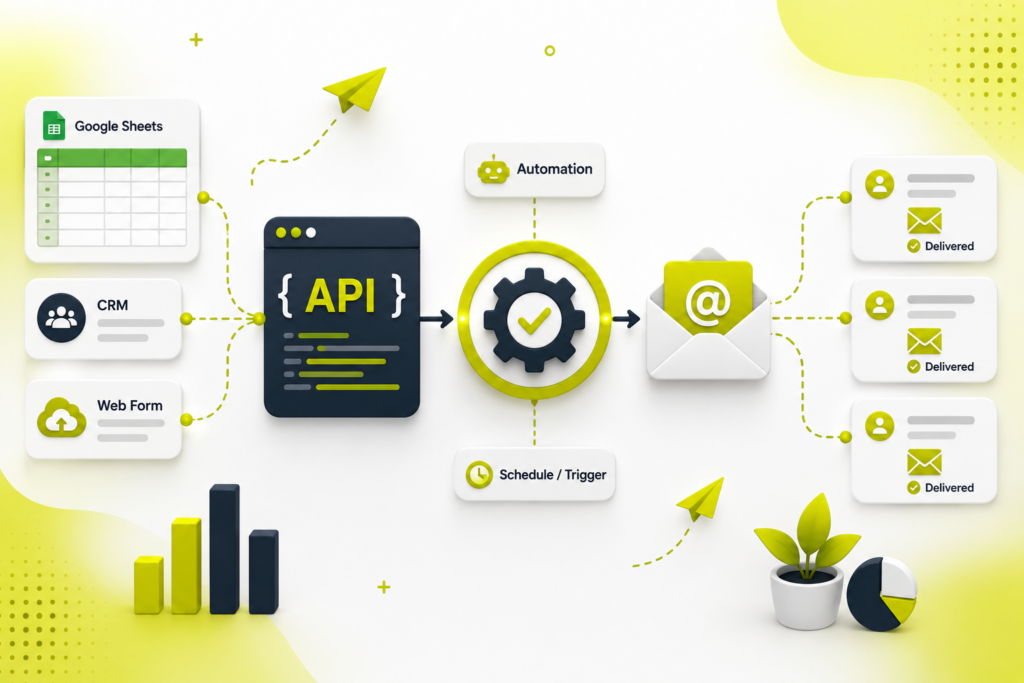
Automated reports, receipts, alerts, and follow-ups — all sent by code, not by hand. Here’s how to connect an email API and automate it properly in 2026, including the domain setup that decides whether your mail lands or bounces.
Quick answer
To automate emails with an API: pick an email-sending provider (Postmark, Resend, SendGrid, Amazon SES, Mailgun, or Brevo), authenticate your sending domain with SPF, DKIM, and DMARC (mandatory now), generate a scoped API key, then send email with an authenticated HTTP request — either directly via REST or with the provider’s SDK. Automate the trigger three ways: fire it on an app event (a signup, a purchase), run it on a schedule (cron or a Google Apps Script time-driven trigger), or wire it through a no-code platform like Make or Zapier. For light volume — like an internal weekly report — Gmail via Apps Script sends for free. The non-negotiable: without SPF, DKIM, and DMARC, Gmail and Yahoo will reject or spam your mail.
Do this before anything else. Since 2024, Gmail and Yahoo require bulk senders to authenticate with SPF + DKIM + DMARC, offer one-click unsubscribe, and keep spam complaints under 0.3% — and enforcement keeps tightening. Mail that fails authentication is increasingly rejected outright or filed as spam. Set up domain authentication first; the code is the easy part.
“Automating email” sounds like one task, but it’s really two: sending (getting a message delivered reliably) and triggering (deciding when it goes out without a human involved). An email API handles the first; a trigger handles the second. Get both right and you can send client reports every Monday, a receipt the instant someone pays, or an alert the moment a metric moves — all untouched by hand.
SMTP vs API — why use an API
You can send through raw SMTP, but a modern email API is a managed relay: the provider looks after IP reputation, authentication, bounce processing, and deliverability, so you focus on the message, not the mail server. Most providers offer both a REST API and SMTP, but the REST API is usually recommended — it’s faster, supports templates and analytics, and returns clear JSON errors when something’s wrong.
Choose your email API
| Provider | Best for | Note |
|---|---|---|
| Postmark | Fast transactional (receipts, resets) | Strong inbox placement, speed-focused |
| Resend | Simple, developer-first sending | Clean API; Node/React/Next.js focus |
| SendGrid | Scale, templates, analytics | Web API v3, broad SDK coverage |
| Amazon SES | High volume, lowest cost | ~$0.10 per 1,000 emails; on AWS |
| Mailgun | Transactional + inbound routing | Automatic DKIM rotation |
| Brevo | Sending + marketing automation | Generous free daily tier |
Match the provider to your volume, message type, and tech stack — don’t chase a single “best.”
Step 1 — Authenticate your sending domain (SPF, DKIM, DMARC)
This is the step people skip and regret. All three are DNS records that prove you’re allowed to send from your domain:
- SPF — a TXT record listing which servers may send mail for your domain.
- DKIM — a cryptographic signature (added via CNAME/TXT) that lets receivers verify the message wasn’t forged or altered.
- DMARC — a TXT record at
_dmarc.yourdomain.comtelling receivers what to do when a message fails SPF/DKIM.
Your provider generates the SPF/DKIM records for you to paste into DNS. For DMARC, start in monitoring mode and tighten gradually — jumping straight to reject before you’ve confirmed alignment is how people accidentally block their own mail:
# DMARC TXT record at _dmarc.yourdomain.com
# Start here (monitor only):
v=DMARC1; p=none; rua=mailto:[email protected]

# Then, once SPF+DKIM pass cleanly, escalate:
# p=quarantine  ->  p=reject
Step 2 — Get a scoped API key
In your provider dashboard, create an API key with the minimum scope needed — typically “Mail Send” only. Store it as an environment variable or secret, never hard-coded in your app or committed to a repo.
Step 3 — Send your first email via the API
Most providers follow the same shape: a POST with a Bearer token and a JSON body. Here’s the pattern (SendGrid-style v3 shown; other providers differ only in field names):
// Node.js — send one email via a REST email API
const res = await fetch('https://api.sendgrid.com/v3/mail/send', {
  method: 'POST',
  headers: {
    'Authorization': 'Bearer ' + process.env.EMAIL_API_KEY,
    'Content-Type': 'application/json'
  },
  body: JSON.stringify({
    personalizations: [{ to: [{ email: '[email protected]' }] }],
    from: { email: '[email protected]', name: 'Your Company' },
    subject: 'Your weekly SEO report',
    content: [{ type: 'text/html', value: '<h1>Report</h1><p>...</p>' }]
  })
});
// Most providers accept multiple recipients per call; check their limits.
Prefer the official SDK (Node, Python, PHP, Go, Java, .NET, Ruby) where available — it’s less error-prone than hand-rolling requests — but the raw REST call above works in any language.
Step 4 — Automate the trigger
Sending once is easy; automating when is the point. Three approaches:
- Event-based (in your app)Call the send function when something happens — a user signs up, a payment clears, a form is submitted. This is how transactional email works: the event is the trigger.
- Scheduled (cron or Apps Script)For recurring emails like reports, run the send on a schedule — a server cron job, or a Google Apps Script time-driven trigger. This pairs perfectly with pulling data first: see fetching Ahrefs reports into Google Sheets, then email the sheet’s summary on the same schedule.
- No-code platformMake, Zapier, or Pipedream can watch a trigger (a new row, a schedule, a webhook) and include a send-email step — automation without writing code, ideal for connecting tools you already use.
The free route for light volume: Gmail + Apps Script
If you just need an automated internal report or a low-volume notification, you don’t need a paid provider at all. Google Apps Script can send through your Gmail/Workspace account on a schedule (mind the daily sending limits — a few hundred on consumer Gmail, more on Workspace):
// Node.js — send one email via a REST email API
const res = await fetch('https://api.sendgrid.com/v3/mail/send', {
  methavod: 'POST',
  headers: {
    'Authorization': 'Bearer ' + process.env.EMAIL_API_KEY,
    'Content-Type': 'application/json'
  },
  body: JSON.stringify({
    personalizations: [{ to: [{ email: '[email protected]' }] }],
    from: { email: '[email protected]', name: 'Your Company' },
    subject: 'Your weekly SEO report',
    content: [{ type: 'text/html', value: '<h1>Report</h1><p>...</p>' }]
  })
});
// Most providers accept multiple recipients per call; check their limits.
That’s a complete, free, self-running report pipeline: data lands in the sheet, and this emails it every week.
Common automation patterns
- Transactional: receipts, password resets, confirmations — triggered by app events.
- Scheduled reports: weekly/monthly performance emails to clients or your team.
- Alerts: a message when a metric crosses a threshold or a job fails.
- Sequences/drips: onboarding or nurture series — usually better handled by a marketing-automation tool than raw API calls.
Deliverability & pitfalls
- Warm up a new domain/IP gradually — don’t blast thousands on day one from a cold domain.
- Don’t jump DMARC to
p=rejectbefore confirming SPF/DKIM alignment, or you’ll black-hole your own mail. - Keep lists clean — invalid and unengaged addresses tank your reputation and spam rate.
- Include a working unsubscribe (one-click for bulk) — it’s required and protects your sender score.
- Never hard-code the API key; use environment variables or a secrets store.
- Monitor bounces and complaints via the provider’s dashboard/webhooks, and handle failures in code.
Automated email is one piece of a reporting and communication stack that runs itself. Combine it with automated data pulls (Ahrefs to Google Sheets) and solid analytics (tracking AI referral traffic in GA4), and measure it against outcomes, not vanity metrics — the theme of common SEO mistakes businesses make. When you’d rather have client reporting and marketing automation built for you, that’s part of our marketing and SEO services.
Frequently asked questions
What is an email API and how does it automate emails?
It’s a service that sends email through managed infrastructure instead of your own server. Your app sends an authenticated HTTP request with recipient, subject, and content, and the provider handles delivery, reputation, authentication, and bounces. It’s automated because that request can be fired by an app event, a schedule, or a no-code workflow.
Do I need SPF, DKIM, and DMARC to send automated emails?
Yes. Reputable email APIs require all three on your sending domain, and since 2024 Gmail and Yahoo require bulk senders to use them plus one-click unsubscribe and a spam rate under 0.3%. Mail failing authentication is increasingly rejected or spam-foldered, so set up domain authentication before writing code.
Which email API is best?
It depends: Postmark and Resend for fast, simple transactional email; SendGrid at scale with templates and analytics; Amazon SES cheapest for high volume (~$0.10/1,000); Mailgun for transactional plus inbound routing; Brevo for sending plus marketing automation. Match provider to volume, message type, and stack.
Can I automate emails for free?
For light volume, yes — Google Apps Script sends through Gmail/Workspace free on a time-driven trigger (subject to daily limits), ideal for internal reports. Most APIs also have free tiers for low-volume transactional sending.
How do I automate sending on a schedule?
Use a server cron job calling the API, a Google Apps Script time-driven trigger for Sheets reports, or a no-code platform (Make, Zapier, Pipedream) with a scheduled send step. All send reports or notifications automatically.
Why are my automated emails going to spam?
Usually missing or failing SPF/DKIM/DMARC, a cold domain with no warmup, poor list hygiene, spammy content, or no unsubscribe. Fix authentication first, warm up gradually, keep lists clean, and monitor bounce and complaint rates.
We build automated, client-ready reporting and marketing workflows — data pulled, formatted, and emailed on schedule, with deliverability done right. Tell us what you want automated and we’ll set it up.

Riya Bhardwaj
Leading content and growth initiatives with a focus on search visibility, audience engagement, and measurable business outcomes. Specialised in SEO, Generative Engine Optimization (GEO), AI search optimisation, and performance-driven content marketing. Passionate about transforming market insights into scalable content strategies that strengthen brand authority and drive sustainable digital growth.