

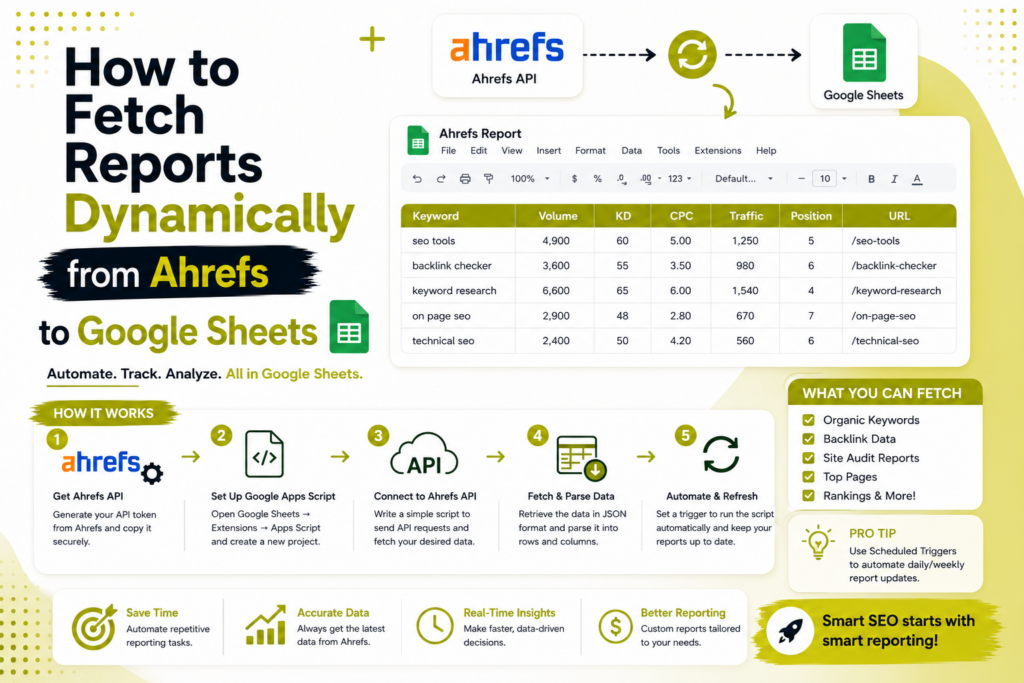
Stop exporting CSVs by hand. Here’s how to pull Ahrefs data into Google Sheets automatically in 2026 — with the current API, a scheduled refresh, and copy-paste code — plus the honest bit about cost.
Quick answer
To fetch Ahrefs reports into Google Sheets dynamically, use the Ahrefs API v3 (the v2 API was shut down on 1 November 2025) via one of two routes: a no-code connector (API Connector, Apipheny, Coupler.io, or Supermetrics) where you set a refresh schedule, or Google Apps Script that calls the API with an Authorization: Bearer header and runs on a time-driven trigger. “Dynamic” simply means it auto-refreshes on a schedule. One caveat to plan for: Ahrefs API access is a separate paid subscription priced by rows, so it isn’t free even though the tools around it can be.
Read this first — it saves hours. Ahrefs API v2 was fully discontinued on 1 November 2025, along with the old Integrations program. Any guide you find that uses apiv2.ahrefs.com or a token= URL parameter is dead. Everything below uses API v3 (api.ahrefs.com/v3/… with a Bearer token), which is the only supported option now.
Pulling Ahrefs metrics — domain rating, backlinks, keywords, organic traffic — into a live Google Sheet is the backbone of good SEO reporting. Done right, your dashboards and client reports update themselves. Done from an outdated tutorial, you’ll spend an afternoon debugging an API that no longer exists. This guide covers the current, working approach, from prerequisites to scheduled automation.
What “dynamically” means here
Dynamic just means scheduled and automatic — the sheet refreshes on its own instead of you exporting a file each week. In Apps Script that’s a time-driven trigger; in a connector it’s the add-on’s built-in refresh schedule. Either way, you set it once and the data keeps itself current.
Before you start: prerequisites (and the cost reality)
- An Ahrefs API v3 subscription. This is separate from a normal Ahrefs tool plan and is billed in tiers by the number of rows you pull (higher tiers include more rows and a lower per-row rate). Confirm current pricing on Ahrefs’ site — but assume the API is a real, ongoing cost, not a free add-on.
- Your API key/token, generated from your Ahrefs API dashboard.
- A Google account and the destination Sheet.
- A method decision: no-code connector (fastest) or Apps Script (most control). Both are below.
Keep the official Ahrefs API v3 docs (docs.ahrefs.com) open in a tab — endpoints, parameters, and exact response field names live there, and they’re the source of truth if a field name in your code needs adjusting.
Method 1 — No-code connector (easiest)
Best if you don’t want to touch code. The steps are similar across API Connector (Mixed Analytics), Apipheny, Coupler.io, and Supermetrics:
- Install the add-onAdd your chosen connector from the Google Workspace Marketplace, then open it from
Extensionsin your Sheet. - Authenticate to AhrefsEither pick Ahrefs from the connector’s app list and authorize it, or create a custom request and add your key as a header:
Authorization: Bearer YOUR_API_KEY. - Build the v3 requestPoint it at the endpoint you need, e.g.
https://api.ahrefs.com/v3/site-explorer/domain-rating?target=example.com&date=2026-07-14. Swap in other endpoints (backlinks, keywords history, metrics) as required. - Map the response to your sheetChoose the destination tab and cell; the connector flattens the JSON into rows and columns.
- Set the refresh scheduleTurn on automatic refresh (hourly/daily/weekly). That’s the “dynamic” part — done.
Note these connectors have their own subscription on top of your Ahrefs API cost, and some gate Ahrefs presets behind a paid tier — check before committing.
Method 2 — Google Apps Script (most control, free tool)
Best if you want full control, custom transformations, or to avoid a connector subscription. You only need a little JavaScript.
Step 1 — Store your key safely. In the Sheet, open Extensions → Apps Script. In the editor, go to Project Settings → Script Properties and add a property named AHREFS_API_KEY with your token as the value. (Never hard-code the key in the script.)
Step 2 — Add the fetch function. Paste this into Code.gs, adjusting the endpoint and field names to match the report you want (verify exact response keys in the v3 docs):
// Pulls a metric from Ahrefs API v3 and logs it to the sheet.
function fetchAhrefs() {
const apiKey = PropertiesService.getScriptProperties()
.getProperty(‘AHREFS_API_KEY’);
const target = ‘example.com’;
const today = Utilities.formatDate(new Date(), ‘UTC’, ‘yyyy-MM-dd’);
// Swap this endpoint for backlinks, keywords, metrics, etc.
const url = ‘https://api.ahrefs.com/v3/site-explorer/domain-rating’
+ ‘?target=’ + encodeURIComponent(target)
+ ‘&date=’ + today;
const options = {
method: ‘get’,
headers: {
‘Authorization’: ‘Bearer ‘ + apiKey,
‘Accept’: ‘application/json’
},
muteHttpExceptions: true
};
const res = UrlFetchApp.fetch(url, options);
if (res.getResponseCode() !== 200) {
Logger.log(‘Ahrefs error: ‘ + res.getContentText());
return;
}
const data = JSON.parse(res.getContentText());
// Adjust these keys to match the actual v3 response shape.
const dr = data.domain_rating && data.domain_rating.domain_rating;
const ss = SpreadsheetApp.getActiveSpreadsheet();
const sheet = ss.getSheetByName(‘Ahrefs’) || ss.insertSheet(‘Ahrefs’);
sheet.appendRow([new Date(), target, dr]);
}
Step 3 — Run it once to authorize the script’s permissions and confirm a row lands in your sheet. Check View → Logs if anything errors.
Step 4 — Make it dynamic with a trigger. Either use the UI (Triggers → Add Trigger → choose fetchAhrefs → time-driven → day timer), or add this helper and run it once:
function createDailyTrigger() {
  ScriptApp.newTrigger('fetchAhrefs')
    .timeBased().everyDays(1).atHour(6).create();
}
Now the fetch runs automatically every morning and appends fresh data — a self-updating report.
Method 3 — Automation platforms
If Ahrefs data needs to flow into a bigger workflow (Slack alerts, a database, multiple destinations), platforms like Make, Pipedream, or Latenode can trigger on a schedule, call the Ahrefs API v3, and write to Google Sheets as one step in a chain. More power and more moving parts than a simple connector — worth it only when the workflow genuinely needs it.
Which method should you choose?
| Method | Best for | Coding? | Extra cost beyond Ahrefs API |
|---|---|---|---|
| No-code connector | Fast setup, non-developers, standard reports | None | Connector subscription |
| Google Apps Script | Full control, custom logic, no add-on fees | Light JS | Free |
| Automation platform | Multi-step workflows & multiple destinations | Low–medium | Platform run/credit cost |
What Ahrefs data can you pull into Google Sheets?
With API v3 you can pull Site Explorer data (overview stats, backlinks, organic and paid traffic), Keywords Explorer metrics and keyword ideas, SERP Overview results, Rank Tracker projects, Site Audit reports and Brand Radar data, according to the official Ahrefs API documentation. The Batch Analysis endpoint returns metrics for up to 100 targets in one request, which suits a competitor tracker.
Most SEO teams get by with three tabs: a domain tab (domain rating over time), a keyword tab (volume and difficulty for your target list) and a rankings tab fed by Rank Tracker. Start with one. A sheet that refreshes a single metric reliably is worth more than five that break every other week.
How do Ahrefs API units work?
Ahrefs meters API requests in units. A request costs the larger of a 50-unit base cost or the per-row cost multiplied by the rows returned. The per-row cost adds up every unique field in your select, where and order_by parameters. Most fields cost 1 unit, some cost 5 or 10, and cached responses cost nothing.
The documentation gives a worked example. A backlinks request that selects two fields, filters on two fields and sorts by traffic touches three unique fields: title and refdomains_source at 1 unit each, and traffic at 10. That’s 12 units per row, so 500 rows cost 6,000 units. Spent units aren’t refundable, so work out the cost before you schedule anything.
Every response also carries headers that report what the call cost: x-api-rows, x-api-units-cost-row, x-api-units-cost-total and x-api-units-cost-total-actual. In Apps Script you can read the response headers and log the cost of each scheduled run to a second tab. That gives you an early warning if a change to your request suddenly makes it ten times more expensive.
Can you test the Ahrefs API for free?
Yes, within limits. Users on any paid plan can run free test queries, though you still need an API key. Site Explorer requests are free when the target is ahrefs.com, yep.com or firehose.com. Keywords Explorer and SERP Overview requests are free when the keyword is only ahrefs, yep or firehose. Free test requests return a maximum of 100 results.
Use these to prove the whole chain works before you spend a single unit: the key, the Authorization header, the sheet write and the time-driven trigger. Once a free test lands correctly in your tab, swap in your own domain. If you add any other keyword to a free Keywords Explorer request, or pass a keyword list ID, it bills as normal.
What rate limits and quotas will you hit?
Three separate systems have limits, and the lowest one decides how fast your sheet can refresh. Here are the numbers from each provider’s documentation:
- Ahrefs API: 60 requests per minute by default. Go over and you get an HTTP 429 response. Ahrefs may also throttle requests dynamically when its systems are under load.
- Google Sheets API: 300 read and 300 write requests per minute per project, and 60 of each per minute per user per project. A batch request counts as one request.
- Apps Script: URL Fetch is capped at 20,000 calls a day on consumer accounts and 100,000 on Google Workspace accounts. A single script run can last up to 6 minutes. Total trigger runtime is 90 minutes a day on consumer accounts and 6 hours on Workspace accounts.
Google’s quota pages say these numbers can change without notice, so check Apps Script quotas and the Google Sheets API usage limits before you rely on them. In practice, two habits keep you well inside all three: write rows in one batch rather than one call per row, and pause briefly between Ahrefs calls if your script loops over many targets. If you do hit a 429, retry after a growing wait rather than hammering the endpoint.
How many rows can you export from Ahrefs?
It depends on your plan. Ahrefs sets limits on rows per report, export rows per month and rows per single export, and the numbers rise with higher subscriptions. Check your own figures under Account settings, Limits and usage, because plan details change. API calls are metered separately in units.
Ahrefs’ help centre explains that export rows count rows exported from every tool except Site Audit and Rank Tracker, and that only the Starter and Lite plans are limited by credits (see the Ahrefs rows and export limits article). If you keep hitting the per-export cap when you download keyword or backlink reports by hand, that’s a good sign it’s time to automate through the API instead.
Why does Ahrefs say your API key can’t access Keywords Explorer or Site Explorer?
Usually it’s the plan. Ahrefs API is available only on eligible paid plans, and every other plan gets a limited set of free test queries. Only workspace owners and admins can create and manage keys. If your plan isn’t eligible, an endpoint that works in the web app can still be closed to your key.
Work through this checklist in order:
- Confirm your plan includes API access in Account settings or on Ahrefs’ pricing page. Don’t rely on forum answers, because plans change.
- Check you’re calling api.ahrefs.com/v3/ with an Authorization: Bearer header. Anything pointing at the retired v2 address or a token in the URL will fail.
- If you set a usage limit on the key, check it hasn’t been used up. Ahrefs recommends limits on keys during testing.
- If you see a 429, you’ve gone over 60 requests a minute or been throttled. Slow down and retry.
- Run one free test query. If that works and your own domain doesn’t, the problem is access or units, not your code.
Should you use Looker Studio instead of Google Sheets?
Sometimes. Ahrefs documents Looker Studio (Data Studio) connectors for Site Explorer, Rank Tracker, Site Audit and Brand Radar. If your goal is a client dashboard with charts, a connector may get you there with less scripting. If you want raw rows you can pivot, join with Search Console data or feed into formulas, the API-to-Sheets route in this guide gives you more control. Plenty of teams run both.
If your reporting stack already leans on Google data, our guides on Search Console BigQuery exports and automating daily SEO tasks show how to combine sources. And if you’d rather talk to an assistant than write scripts, see how MCP connects AI assistants to GA4 and Search Console.
A cost-safe setup checklist
- Create a key as a workspace owner or admin, and put a usage limit on it while you test.
- Store the key in Script Properties, never in the code.
- Run a free test query to confirm the header, the response shape and the sheet write.
- Select only the fields you need. Each extra field adds to the per-row cost.
- Check the x-api-units-cost-total header on one real request and multiply by your planned schedule.
- Set the trigger to daily or weekly, not hourly.
- Log each run’s cost and any error code to a second tab.
- Review the log after a week before you add more targets.
For the full set of endpoints and field names, keep the official Ahrefs API documentation open beside your script. Last verified: 12 October 2026.
Keep costs and errors under control
- Pull only what you need. The API bills by rows — request specific metrics and date ranges, not everything.
- Refresh sensibly. Daily or weekly is plenty for most reporting; hourly burns rows fast.
- Cache history in the sheet and append new rows instead of re-pulling the full history each run.
- Batch targets carefully and watch your plan’s included row allowance.
- Handle failures — use
muteHttpExceptionsand check the response code so a bad call doesn’t corrupt your sheet.
Common pitfalls
- Using the dead v2 API. The number-one cause of “why won’t this work” — old tutorials point at
apiv2.ahrefs.com. Use v3. - Hard-coding the API key in the script instead of Script Properties — a security risk, especially in shared sheets.
- Guessing response field names. They vary by endpoint; log the raw JSON once and map the exact keys from the v3 docs.
- Assuming it’s free. The API subscription is the real cost; the connection method is the cheap part.
Getting the pull working is step one; turning that data into decisions is the real value. If you’re building an SEO reporting stack, the same discipline applies to your analytics — see tracking AI referral traffic in GA4 — and make sure you’re measuring outcomes, not vanity metrics, as we cover in common SEO mistakes businesses make. When you’d rather have reporting and SEO handled end-to-end, that’s our SEO and technical SEO teams’ work.
Frequently asked questions
Does the Ahrefs API v2 still work?
No. Ahrefs API v2 was fully discontinued on 1 November 2025, along with the legacy Integrations program. Any tutorial using apiv2.ahrefs.com or a token= URL parameter no longer works — use API v3 with an Authorization: Bearer header against api.ahrefs.com/v3/.
Can I connect Ahrefs to Google Sheets for free?
The tools can be free (Apps Script) or have trials (connectors), but the Ahrefs API itself needs a paid subscription that’s separate from a standard Ahrefs plan and priced by rows. Budget for the API regardless of method.
What does "fetch dynamically" actually mean?
The data refreshes automatically on a schedule instead of manual CSV exports. Apps Script uses a time-driven trigger (e.g. daily at 6am); connectors use their built-in refresh schedule. Either way, the sheet updates itself.
Is the Ahrefs API free?
No, not for real data. The Ahrefs API is available on eligible paid plans, and each request uses API units from your plan’s monthly allowance. Free test queries exist: Site Explorer calls with ahrefs.com, yep.com or firehose.com as the target cost nothing, capped at 100 results.
How do I control Ahrefs API costs?
Select only the fields you need, because a request costs the larger of 50 units or the per-row cost times the rows returned. Refresh daily or weekly, cache history in the sheet, put a usage limit on your key, and log the x-api-units-cost-total header for every run.
Is there an API for Google Sheets?
Yes. The Google Sheets API lets code read and write spreadsheet data. Inside a sheet you can also use Apps Script, which has a built-in spreadsheet service, so you don’t need the REST API just to write rows from a script that runs on a schedule.
Are Google Sheets API calls free?
Standard use is free. Google lists quotas of 300 read and 300 write requests per minute per project, and 60 of each per user per project. Its documentation also says exceeding those quotas is planned to incur charges later in 2026, so check the usage limits page before heavy automation.
Can Google Sheets pull data from an API?
Yes. Apps Script’s UrlFetchApp can call an HTTP API and write the response into cells, and connector add-ons do the same without code. A normal sheet formula can’t send an Authorization header, so use a script or connector, then add a time-driven trigger to refresh the data.
How many rows can you export from Ahrefs?
It depends on your plan. Ahrefs limits rows per report, export rows per month and rows per single export, and the limits rise with higher subscriptions. Check Account settings, Limits and usage, for your own numbers. API calls are metered separately, in units.
Why does my Ahrefs API key say it has no access to Keywords Explorer or Site Explorer?
Usually your plan. Ahrefs API is available only on eligible paid plans, and other plans get a limited set of free test queries. Also check that you’re calling the v3 endpoint with a Bearer header, that your key’s usage limit isn’t used up, and that you aren’t being rate-limited at 60 requests a minute.
We build automated, client-ready SEO dashboards — Ahrefs, Search Console, GA4, and more — so your team spends time on strategy, not spreadsheets. Tell us what you need to track and we’ll wire it up.

Riya Bhardwaj
Leading content and growth initiatives with a focus on search visibility, audience engagement, and measurable business outcomes. Specialised in SEO, Generative Engine Optimization (GEO), AI search optimisation, and performance-driven content marketing. Passionate about transforming market insights into scalable content strategies that strengthen brand authority and drive sustainable digital growth.